

Blog · 15 May 2026 · 3 min read
Free uptime monitoring with your own Telegram bot — every GoCelerus plan
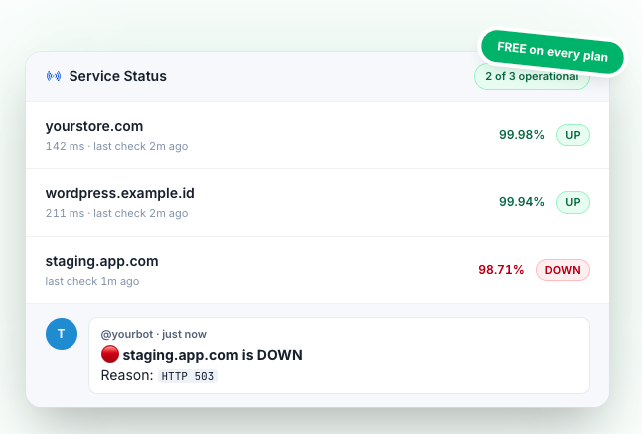
Every hosting plan on GoCelerus ships with free domain uptime monitoring. We probe every 5 minutes and ping your own Telegram bot when something goes down — privacy-first, no third-party SaaS account, no $20-a-month upcharge. Here's how to set it up in under a minute.
By Admin GoCelerus
Why this matters
Your hosting can be perfect, your SSL pristine, your nameservers correct — and you still won't know your site is down at 3 AM unless something tells you. The standard fix is bolting on a third-party uptime monitor: another SaaS account, another bill (usually $7 to $29 a month), another vendor with eyes on your URLs.
We thought that felt silly when we were already polling everyone's domain anyway to keep our own status board honest. So we shipped the monitor as a free feature on every plan — shared hosting, VPS, dedicated, the lot.
What you actually get
Out of the box, with no extra config, GoCelerus checks every active domain on your account once every 5 minutes. We:
- Probe the actual URL (HEAD with GET fallback on 405, 10-second timeout)
- Classify outcomes cleanly — 5xx + 503 means DOWN, network failure means DOWN, anything else is UP
- Log every event to a 90-day rolling history, with response time and HTTP status
- Only notify on transitions — you get a ping when something goes UP → DOWN or DOWN → UP, never a spam stream while the probe is happy
- Send a weekly digest every Monday morning with uptime %, total incidents, and downtime minutes per service
You can see the full timeline under Account → Monitoring, with per-service detail one click away.
Bring your own Telegram bot
Here's the part most people haven't seen before: we don't centralise the alert pipeline. Instead, you create your own Telegram bot and paste the token into your account. We post to it directly.
This has three properties we care about:
- Privacy. We don't run a bot account that reads anyone's chats. Your alerts land in a chat between your bot and you. We see the delivery acknowledgement, not the message body.
- Free. Telegram doesn't charge for bot messages. We don't either. So there's no per-alert cost to pass on.
- Portable. If you ever leave GoCelerus, the bot is still yours. You can repoint it at anything else that speaks the Bot API.
Setting it up (60 seconds)
You'll need two values: a bot token and a chat ID.
Step 1. Open Telegram, search for @BotFather, send /newbot. Pick a name + username. BotFather replies with a token that looks like:
1234567890:ABCdefGHIjklmnoPQRstuVWXyz1234567890
That's your token. Treat it like a password.
Step 2. Search for @userinfobot in Telegram and send any message. It replies with your numeric chat ID (e.g. 123456789).
Step 3. Open Account → Monitoring in the client portal, paste both values, and hit Send Test. If the test ping lands in your Telegram, you're done. Toggle monitoring on for any service from the same page.
If the test fails, the most common reason is that you haven't started a chat with your bot yet — Telegram won't deliver to a bot the user has never spoken to. Send your bot a
/startmessage first.
Public status page (bonus)
Every customer also gets a tokenised public status page at /status/{token} — same 7-day and 30-day uptime numbers, read-only, no other customer's data leaks. Useful to share with stakeholders or paste into an SLA conversation. Opt in from the same Monitoring tab.
Why we built it free
Monitoring is a solved problem and we already had the data. Charging extra for "tell you when your site is down" felt the wrong side of the value line for a hosting provider. If you're paying us for uptime, the alert when it breaks is part of the deal.
Spin up a plan, set the bot in a minute, and forget about it until the digest lands on Monday.